![Logo Jobtoolz - White.svg]](https://help.jobtoolz.com/hubfs/Logo%20Jobtoolz%20-%20White.svg)
1. Open or create a job posting
Go to the job overview and either create a new job posting or open an existing one that you want to edit.
2. Scroll to the Salary Range section
At the bottom of the job description, you will find the Salary Range section. Here you can enter the salary information for the position. 💰

3. Enter a minimum and maximum salary
Fill in the provided fields with a minimum and maximum amount.

This helps candidates immediately get a realistic view of the salary associated with the position.
Example:
Minimum salary: €2,000
Maximum salary: €2,500
This way, candidates immediately know the salary range for the role.
4. Select the correct joint committee
You can also select the relevant joint committee for the position.
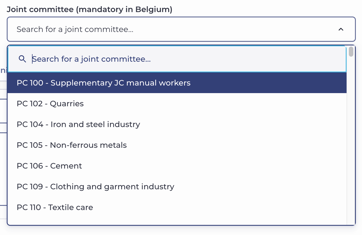
This provides additional transparency and gives candidates more insight into the status and sector the role falls under.
5. Save your changes
Check whether all details have been filled in correctly and save the job posting.
Your salary range will then be published together with the vacancy. 🚀