-
Employer Branding
-
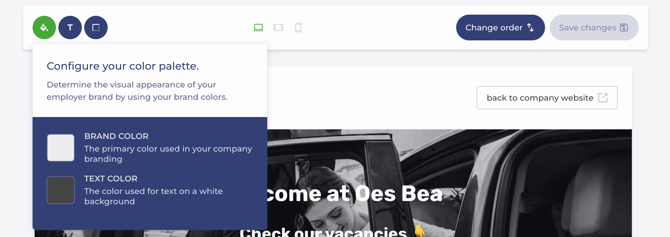
Configure your colour palette.
-
Select a font for headings and body text
-
Increase or decrease the corner radius of specific elements.
-
-
Vacancies
-
Step 1 – Description
-
Title
Make sure the URL always matches the title of your vacancy. You can do this by clicking the paperclip icon to update the URL to match the vacancy title.
-
Motivation for creating the vacancy (optional)
-
Location
-
Contract type
-
Employment status
-
Desired experience
-
Reference number (optional)
-
Working hours arrangement
-
Job type
-
Hours per week
-
Vacancy image
-
Job description
-
Metadata for social media and search engines
-
-
Step 2 – Application Form
Specify which fields applicants must complete to apply, and indicate which fields are mandatory or optional. -
Step 3 – Recruitment Process
Define the stages candidates must go through to join your organisation.
- Step 4 – Publish
A vacancy must be published to be visible on your employer branding page. - Step 5 – Reach More Candidates
- Haven't requested the VDAB integration yet?
In the final step of your vacancy, Reach More Candidates, click on VDAB. Navigate to VDAB and click 'Post on VDAB'.
Here, you can purchase the VDAB integration.
Once you have purchased the VDAB integration, we will contact VDAB to activate your VDAB account with Jobtoolz. - Already requested the VDAB integration? Read on here.
- Haven't requested the VDAB integration yet?
-
English
![Logo Jobtoolz - White.svg]](https://help.jobtoolz.com/hubfs/Logo%20Jobtoolz%20-%20White.svg)